One-time purchase · no subscription

Ask your files
anything.

AtlasFiles is private AI file search for your Mac. Describe any file in plain English to find it — or ask a question and get the answer from inside your PDFs, Word docs and spreadsheets. Everything stays on your Mac.

For Mac — Apple Silicon & Intel·Free 7-day trial · no card

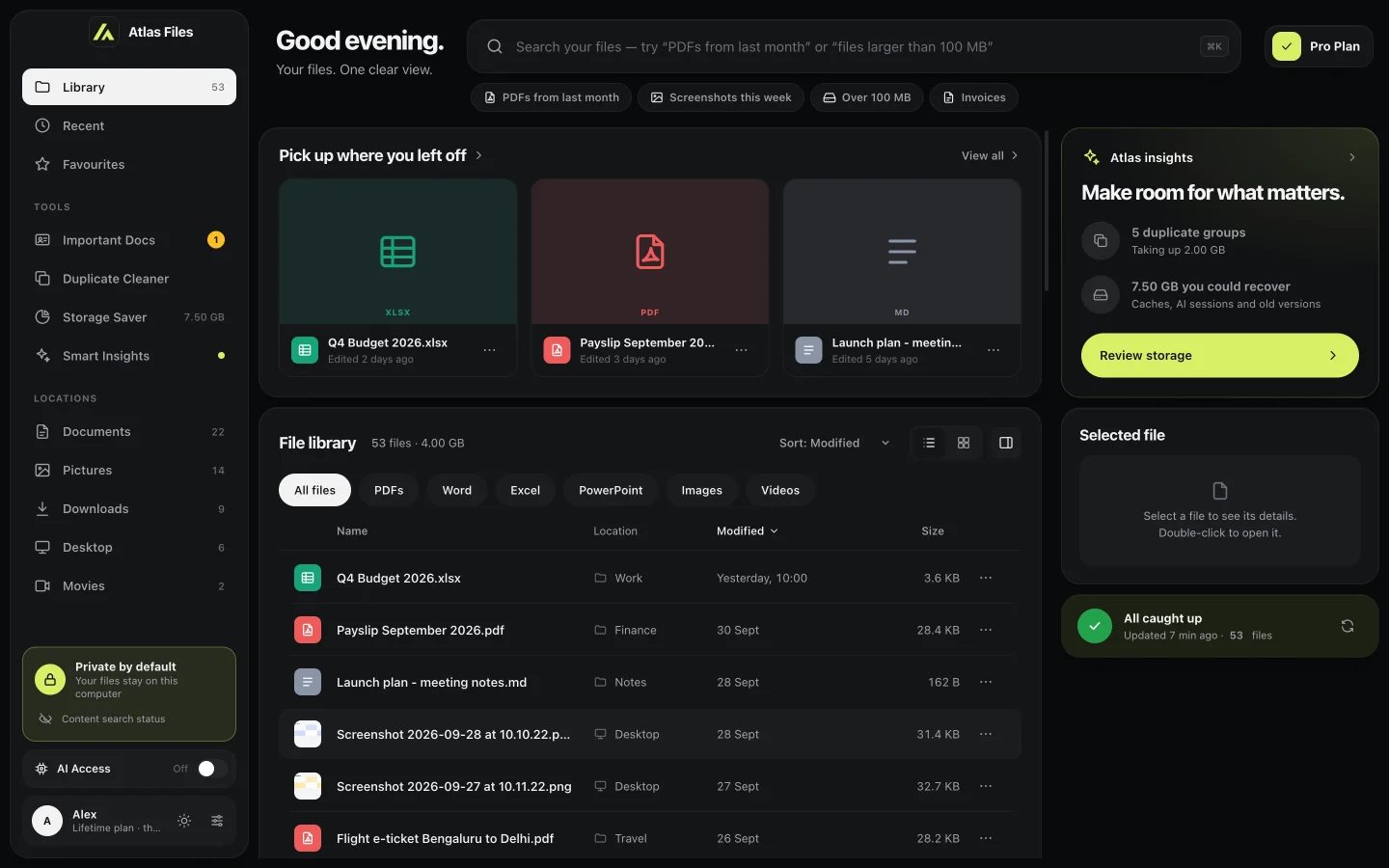
AtlasFiles for Mac: the file library with recent files, type filters and a list of documents

Real screenshots from the app. Press ⌥ Space in any app to search or ask.

Reads inside PDF Word Excel PowerPoint Text & Markdown CSV HTML Scans via OCR
Demo

See it in 47 seconds.

47 seconds · sound on
How it works

Three minutes from install
to your first answer.

  1. 01

    Install and open

    AtlasFiles indexes your Desktop, Documents, Downloads, Pictures and Movies — on your computer, in the background.

  2. 02

    Press ⌥ Space

    A search bar appears over whatever you’re doing. Type a name, a phrase, or a question.

  3. 03

    Get the file — or the answer

    Open it, reveal it, copy the path. Ask a question and get the exact value, with the sentence it came from.

Inside the app

One app to find, understand
and clean up your files.

Search

Search the way you talk.

“PDFs from last month”, “photos larger than 10 MB”, “invoices in Downloads”. AtlasFiles turns plain English into filters for type, date, size and folder — and searches inside documents, not just file names.

  • Typos fixed using the words in your own files
  • Full-text search in PDF, Word, Excel, PowerPoint and text
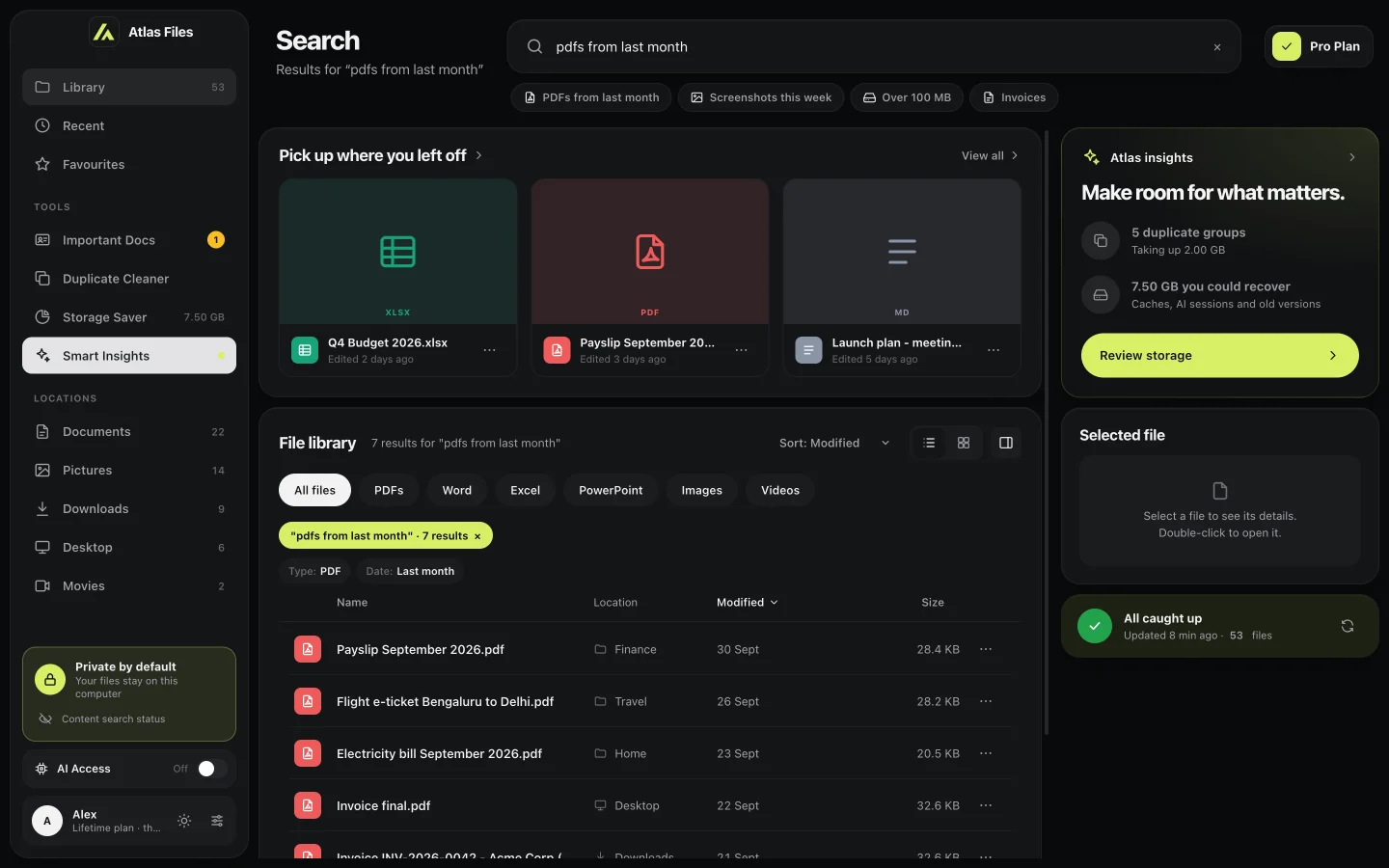
Search results for 'pdfs from last month' with Type: PDF and Date: Last month filters
Answers

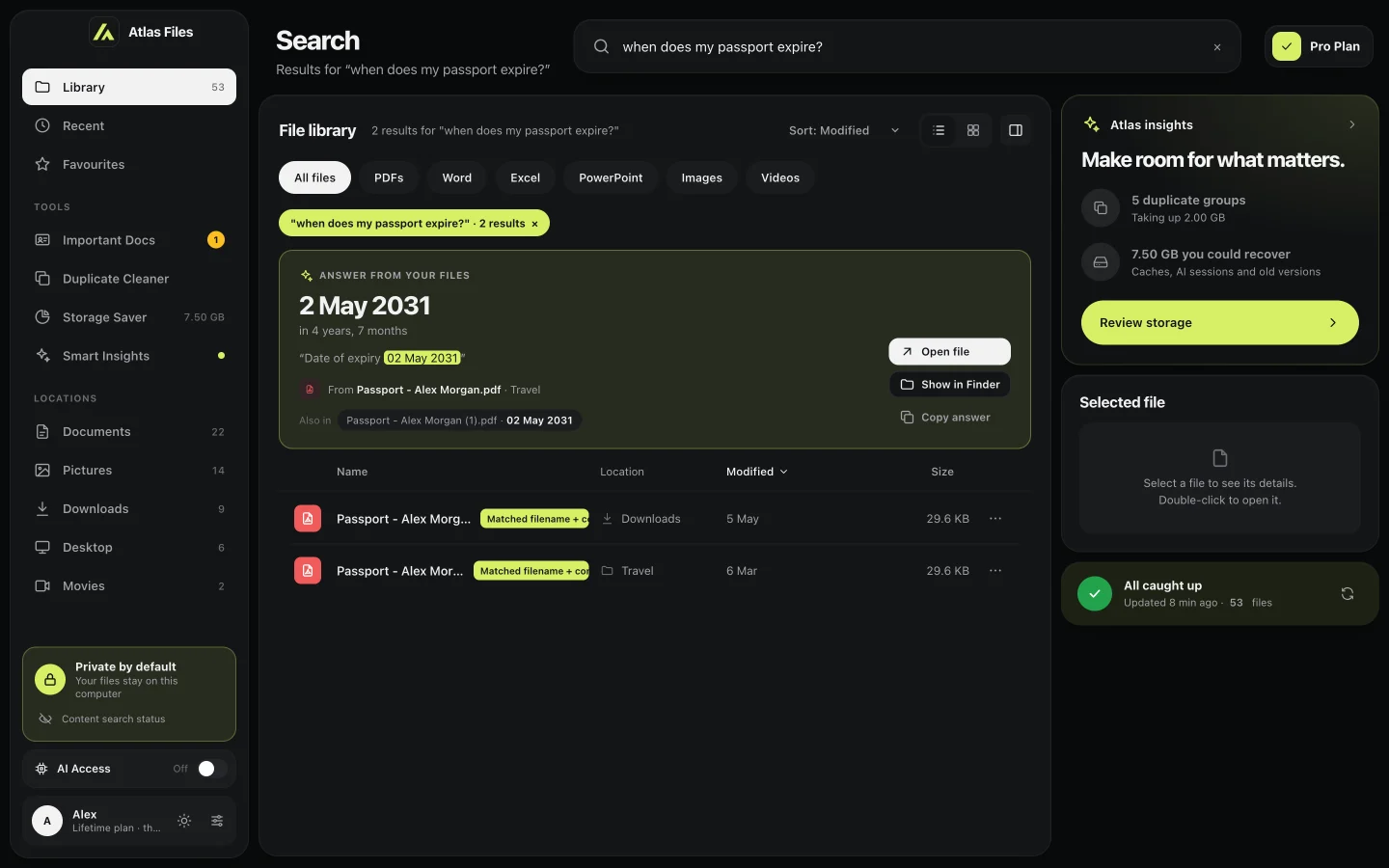
Answers, with receipts.

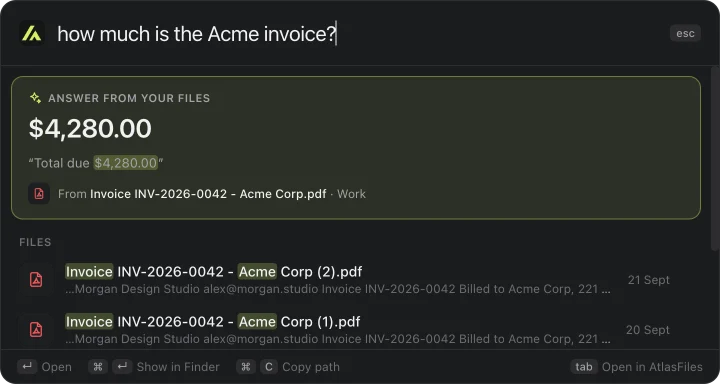
Ask “when does my passport expire?” and get 2 May 2031 — plus the exact sentence and the file it came from. Dates, amounts, policy numbers, PNRs and emails, pulled straight from the page.

  • Every answer cites its source
  • Open the file or copy the answer in one click
An answer card showing 2 May 2031 quoted from Passport - Alex Morgan.pdf
Important Docs · Pro

Never miss a renewal again.

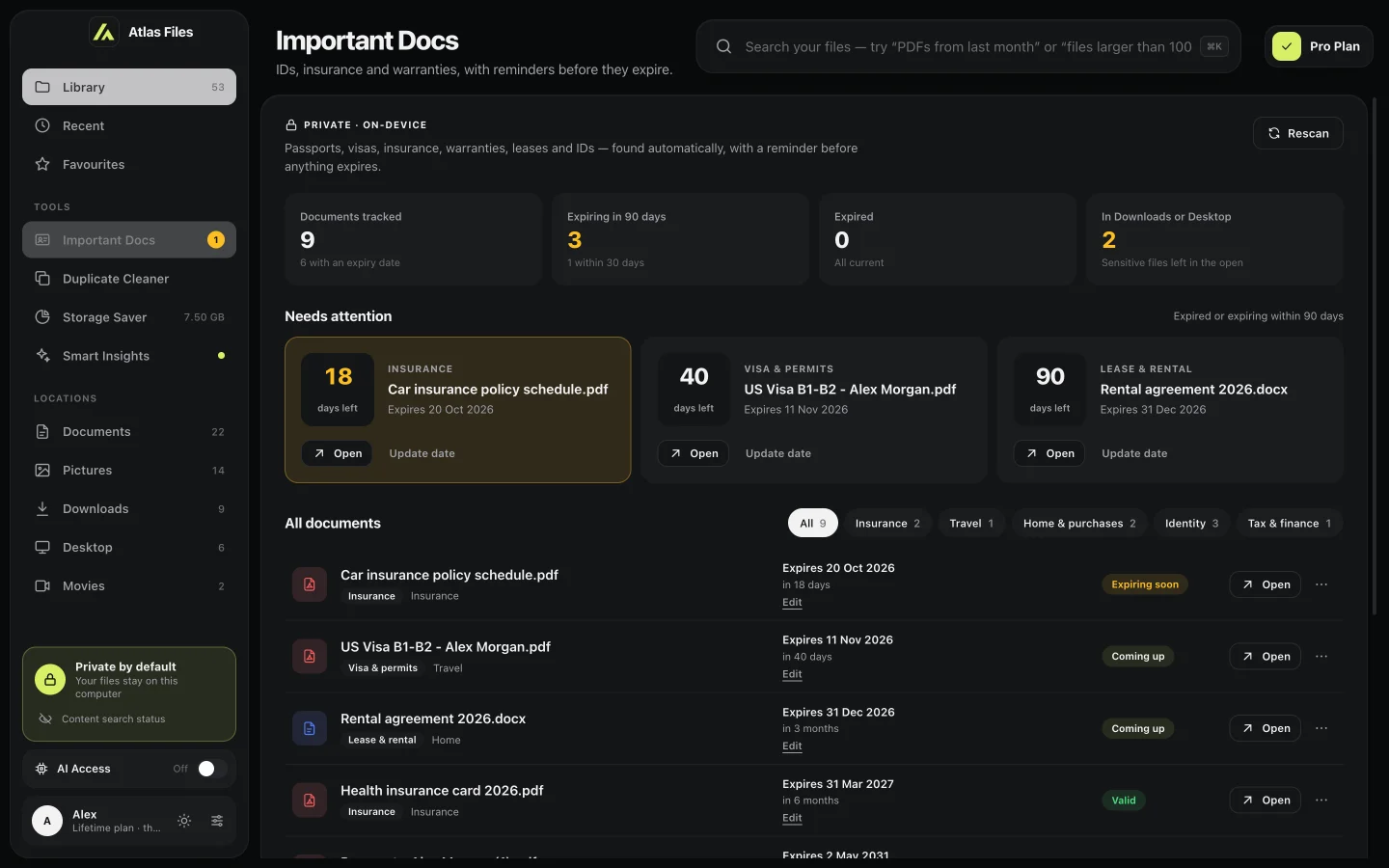
AtlasFiles finds your passports, visas, insurance, warranties and leases, reads their expiry dates, and reminds you 60, 30 and 7 days before anything lapses — whenever AtlasFiles is running, which it can do quietly from login. It also flags IDs left sitting in Downloads.

  • Expiry dates read from the document itself
  • Set or correct a date for any scan
Important Docs showing car insurance expiring in 18 days, a visa in 40 days and a lease in 90 days
Duplicate Cleaner · Pro

Five copies? Keep one.

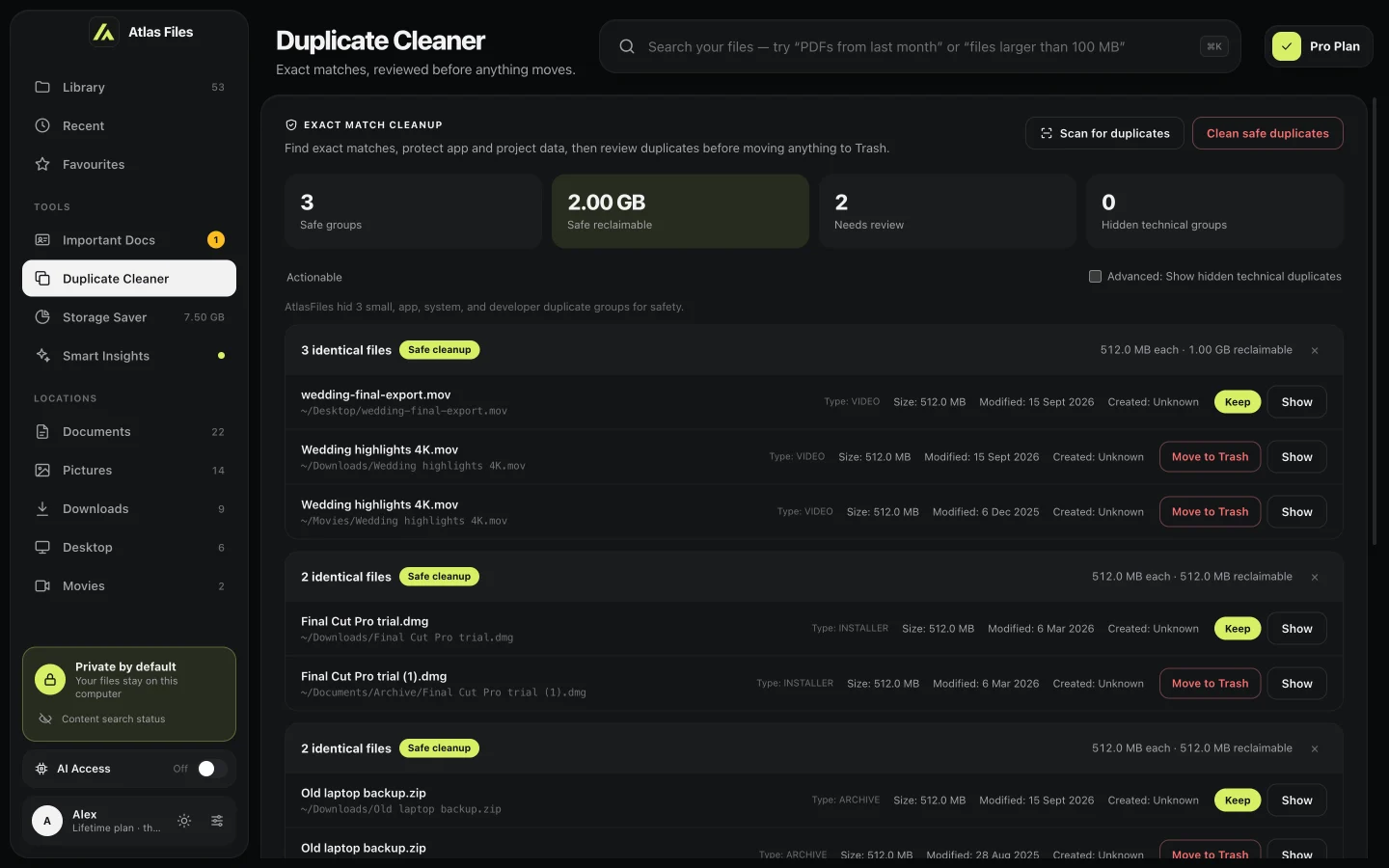
Byte-for-byte matching finds the same file saved again and again across folders. AtlasFiles keeps the original, shows you every extra copy, and asks before moving any of them to the Trash.

  • Exact content matches, not look-alike names
  • App, system and project folders are protected
Duplicate Cleaner with three safe groups and 2.00 GB reclaimable
Smart Insights · Pro

Know your files at a glance.

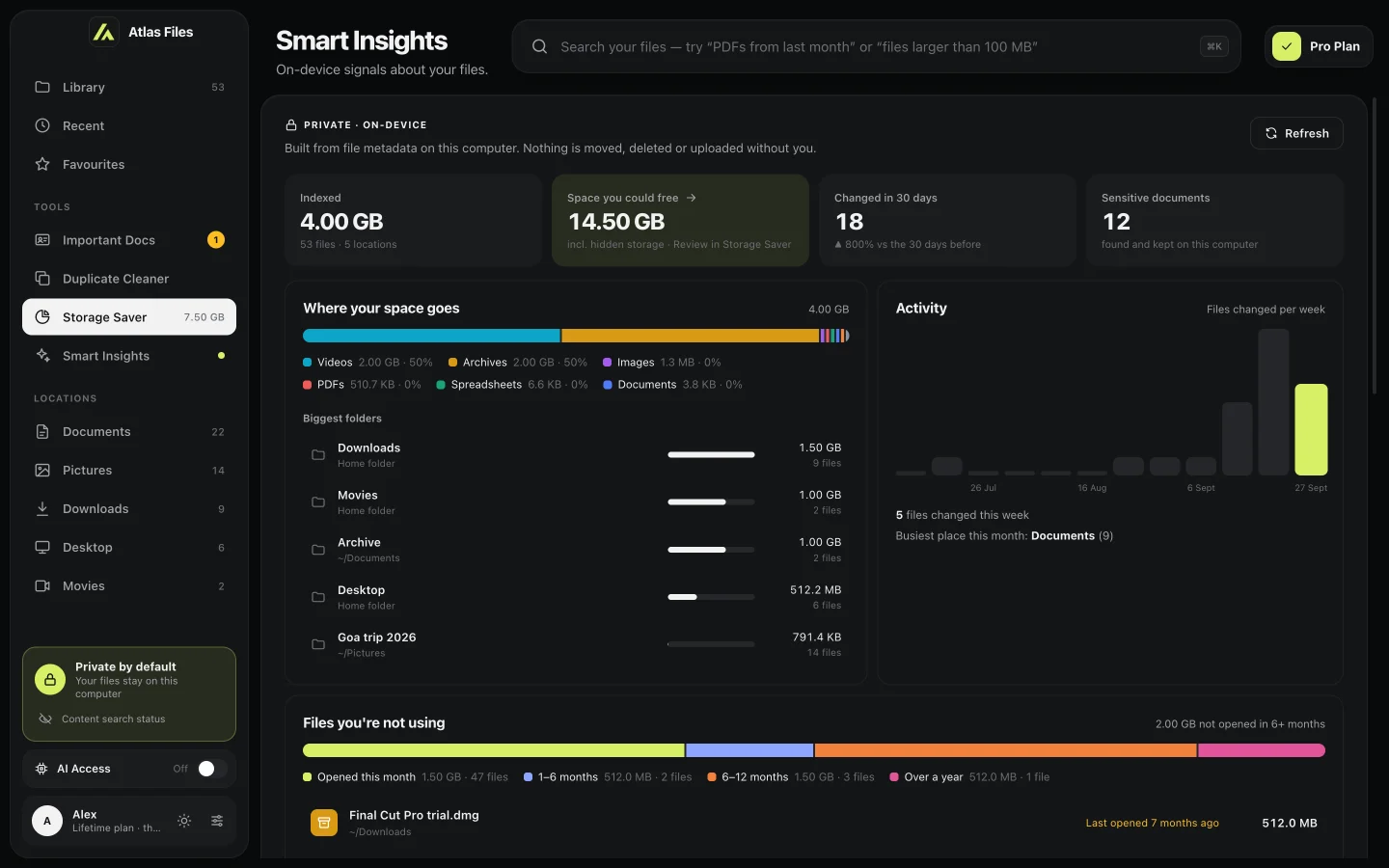
Where your space goes, what changed this month, how many sensitive documents you keep — and the big files you haven’t opened in months.

  • Built from metadata on your computer
  • “Space you could free” jumps straight to Storage Saver
Smart Insights with indexed size, space you could free, recent changes and sensitive documents
Preview & OCR

Read scans like text.

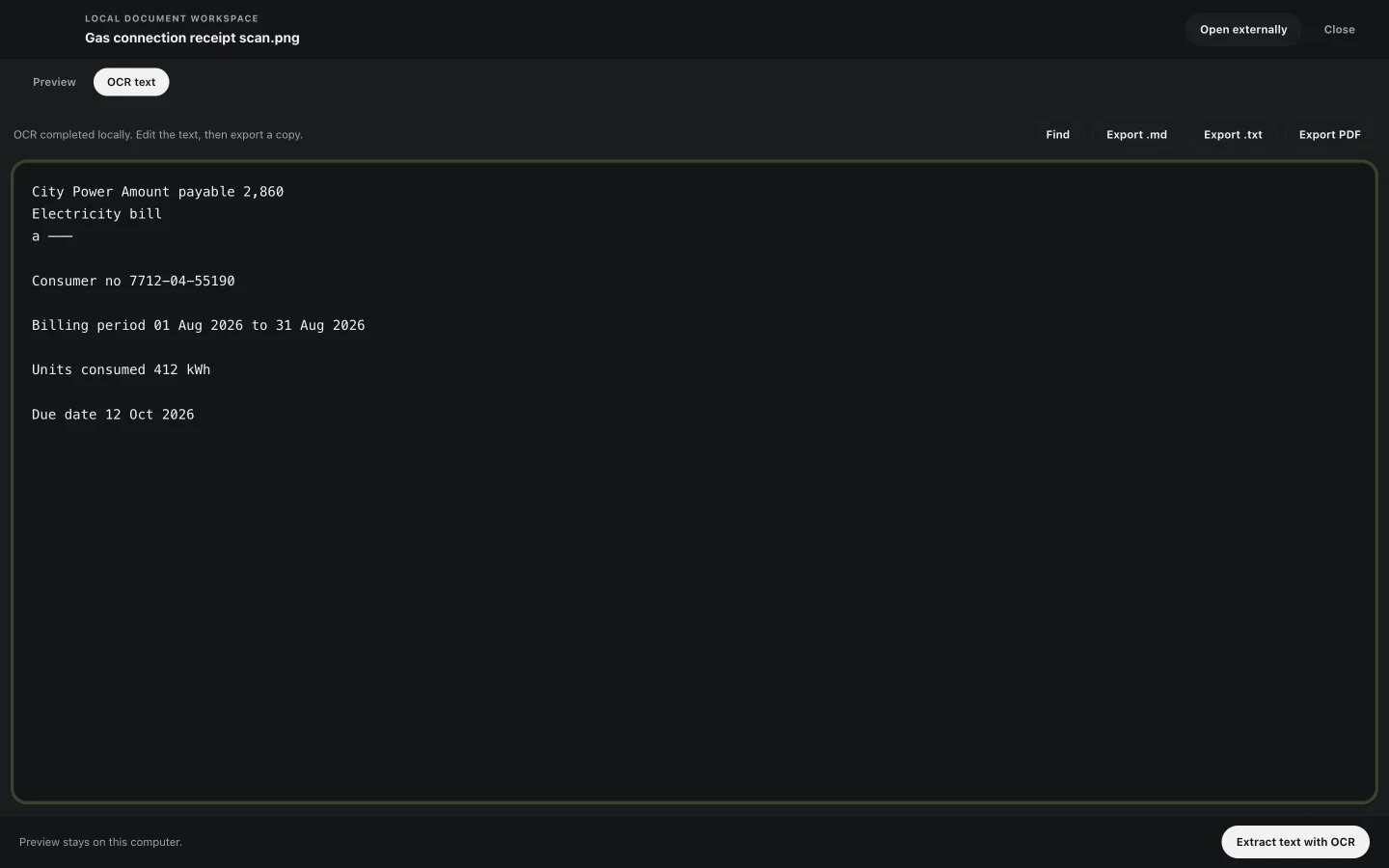
Preview PDFs and images without leaving the app. Pull editable text out of a scan or photo with on-device OCR, then export it as Markdown, plain text or PDF. The original file is never changed.

  • Press Space on a PDF or image to preview
  • OCR runs locally — nothing is uploaded
OCR text extracted from a scanned electricity bill
Storage Saver · Pro

Disk almost full?
Here’s where it went.

Finder and Spotlight only show your files. The real space hogs stay hidden: months of AI coding sessions, caches that rebuild themselves, developer toolchains and apps you stopped using. Storage Saver finds them and frees the part that’s safe to remove.

  • Checks 30+ hidden places — Claude, Codex, Cursor, Xcode, npm, Homebrew and more
  • Only the safe part: old sessions, caches that rebuild, outdated versions
  • Everything goes to the Trash, so you can put anything back

AI tools

Claude Code sessions and checkpoints · Codex sessions and old runtimes · Claude, ChatGPT and Cursor caches · Hugging Face model cache

Developer

Xcode DerivedData, device support and simulators · npm, pnpm, Yarn and Bun · pip and uv · Homebrew · Gradle, Cargo and CocoaPods · Playwright and Puppeteer browsers

Apps and your files

Apps you haven’t opened in 90+ days · old app logs · your largest files and videos · installers and archives · big files left in Downloads

Local AI models (Ollama, LM Studio) and Xcode archives are shown so you know they’re there, but never cleaned automatically. Hidden-storage cleanup only touches caches, sessions, logs and old versions — never your documents.

Private by design

Your files never
leave your computer.

The index, the search, the answers and the OCR all run on your device. The only thing AtlasFiles sends to our server is a license check — never a file, a file name or a word of what’s inside. If you turn on AI Access, the assistant you connect reads what it needs under its own terms.

Runs locally

Indexing, answers and OCR use your computer’s own processor.

Search works offline

No connection needed to search, ask, preview or clean up. Pro checks your license online about once a month.

Cloud folders stay closed

OneDrive and Google Drive are opt-in and indexed by name only until you open a file.

Nothing deleted for good

Every cleanup goes to the Trash, after you review it.

AI Access · Pro

Claude and Codex,
meet your files.

Turn on AI Access and AtlasFiles connects your local index to Claude Desktop and Codex. Your assistant can search your files, find answers and read the documents you’ve indexed — straight from your computer, read-only, and off with one switch.

  • One switch sets up Claude Desktop and Codex
  • Read-only: search, answer and read — never edit or delete
  • Limited to the folders AtlasFiles indexes
Pricing

Pay once. Keep it for life.

No subscription, no renewals. One price for every Pro feature.

Early-bird price AtlasFiles Pro · Lifetime
$19one-time

Launch price for early supporters.

  • Search, quick search (⌥ Space) and answers
  • Important Docs with expiry reminders
  • Duplicate Cleaner and Storage Saver
  • Smart Insights, Preview & OCR, AI Access
  • Lifetime license for 1 computer — move it to a new one any time
  • All future updates included

Sign in with Google or your email — your license is tied to your account.

Secure checkout by Dodo Payments · taxes calculated at checkout · one-time payment, all sales final

Try it first — free for 7 days

No card needed — just sign in. The trial includes:

  • Search in plain English and full-text search
  • Quick search from any app (⌥ Space)
  • Answers from your documents
  • Preview & OCR

Important Docs, Duplicate Cleaner, Storage Saver, Smart Insights and AI Access unlock when you buy. After 7 days, buy once to keep using AtlasFiles.

Already bought? Open the app and choose Connect Device.

Download

Get AtlasFiles for Mac.

Free for 7 days — sign in with Google or email, no card. Already bought? Install it, then click Connect Device in the app.

Download for Apple SiliconM1, M2, M3, M4 and newer Download for Intel MacOlder Macs with an Intel processor

Not sure? Open the Apple menu → About This Mac: “Chip: Apple M…” means Apple Silicon; “Processor: Intel” means Intel. Requires macOS 12 Monterey or later.

FAQ

Questions,
answered.

Something else? support@atlasfilesai.com

Is it really a one-time payment?

Yes. You pay once and keep AtlasFiles Pro for life, including updates. There is no subscription and nothing renews.

Do my files get uploaded anywhere?

No. Indexing, search, answers and OCR all run on your Mac, and no cloud AI model reads your documents. The only thing that reaches our server is your license check — never your files, their names or their contents.

How is AtlasFiles different from Spotlight?

Spotlight is great for opening apps and files by name. AtlasFiles is built for your documents: it turns plain-English requests like “PDFs from last month” into exact filters, reads inside PDFs and Office files to answer questions with the sentence the answer came from, and adds tools Spotlight doesn’t have — Important Docs expiry reminders, a Duplicate Cleaner, Storage Saver and Smart Insights.

What does AI Access share with Claude or Codex?

Nothing until you turn it on — it’s off by default. When it’s on, Claude Desktop or Codex on your Mac can search and read the files AtlasFiles has indexed, read-only, when you ask them to. Those assistants follow their own privacy terms. Turn it off any time with one switch.

What can I do in the free trial?

For 7 days you can search, use quick search (⌥ Space), get answers from your documents and use Preview & OCR. Important Docs, Duplicate Cleaner, Storage Saver, Smart Insights and AI Access unlock with the lifetime purchase.

How many computers can I use?

One license covers 1 computer at a time. New computer or a reinstall? Connect it and the license moves over. You can also remove a computer from your account page.

Which file types can it read?

It searches the names of supported files — documents, images, audio, video, archives and more — in the folders you choose, and reads the text inside PDF, Word (.docx), Excel (.xlsx), PowerPoint (.pptx), text, Markdown, CSV and HTML files. Scans and photos can be turned into text with OCR.

What does Storage Saver clean, and is it safe?

It checks 30+ places file search never shows: AI tool sessions (Claude Code, Codex), app and browser caches, developer caches (Xcode, npm, Homebrew and more) and apps you haven’t opened in months. It only offers what’s safe to remove — sessions older than 30 days, caches that rebuild themselves and outdated versions, always keeping the one in use. Everything goes to the Trash, so you can put it back.

How do answers work?

AtlasFiles looks for the passage in your indexed documents that matches your question and pulls out the value — a date, an amount, an ID or an email — showing the sentence and file it came from. It reads your documents; it doesn’t make things up.

Which systems are supported?

AtlasFiles runs on Macs with Apple Silicon or Intel. A Windows version is planned.

Can I get a refund?

All sales are final, so please try AtlasFiles free for 7 days before buying. If you were charged by mistake — for example, twice for the same license — email us and we’ll fix it.

How do promo codes work?

Click “Have a promo code?” next to the price, before you continue to payment. Discount codes lower the price; some codes unlock AtlasFiles Pro for free — you’ll sign in to redeem those.

Your files already
have the answers.

Lifetime access for a one-time $19 while early-bird pricing lasts.

Quick search answering 'how much is the Acme invoice?' with $4,280.00